
RMT Stack Topography
The RMT stack topography explains how RMT source, compiler, kernel, Fabric and UI layers work together. It helps you treat XTendRMT not only as a document language, but as a building block for larger applications.
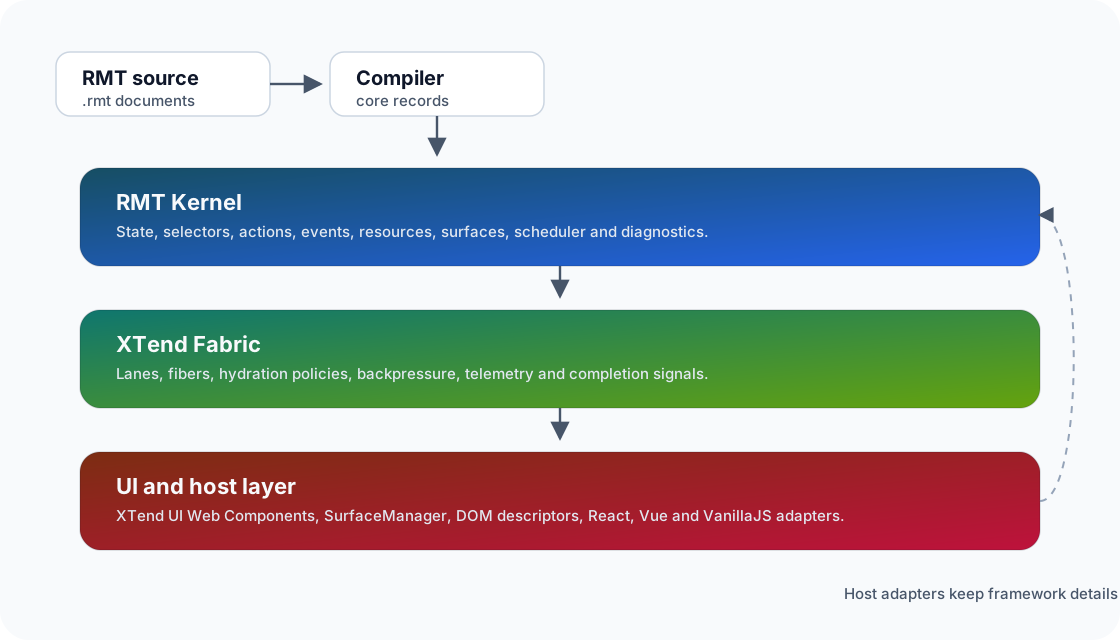
Layers
RMT source describes app structure, state, selectors, actions, events, resources, surfaces and scheduling intent. The compiler turns that description into stable core records.
The RMT kernel processes those records in a host-neutral way. It schedules work, manages runtime state, triggers actions, publishes diagnostics and stays independent from DOM, CSS and frameworks.
XTend Fabric translates scheduling intent into lanes, hydration decisions, telemetry and backpressure signals. Host adapters connect those signals to browser, server, worker or app shell environments.
XTend UI, React, Vue or VanillaJS render at the edge of the system. They receive props, attributes, slots, events and hydration tasks through adapters, so the concrete UI layer remains replaceable.
Integration Models
In an XTend-only model, RMT describes the app shell, Fabric coordinates the work and XTend UI renders the visible Web Components.
In an MFE model, an XTend shell can provide surfaces for other teams. Those surfaces can use XTend UI, React, Vue or VanillaJS as long as they are connected through clear DOM and adapter boundaries.
In a scheduler model, the RMT kernel runs as an orchestration layer beside existing frontends. The app then uses RMT for state, actions, resources and scheduling while the concrete UI can stay in an existing framework.
Next Steps
Concrete runtime boundaries
tools/rmt-language/vnext-parser.js reads source, tools/rmt-language/vnext-compiler.js emits core records, and xtendrmt/rmt-app-runtime.js passes them to explicit host adapters. These entry points locate failures: syntax belongs to the parser, reference resolution to the compiler, and missing browser services to an adapter.